


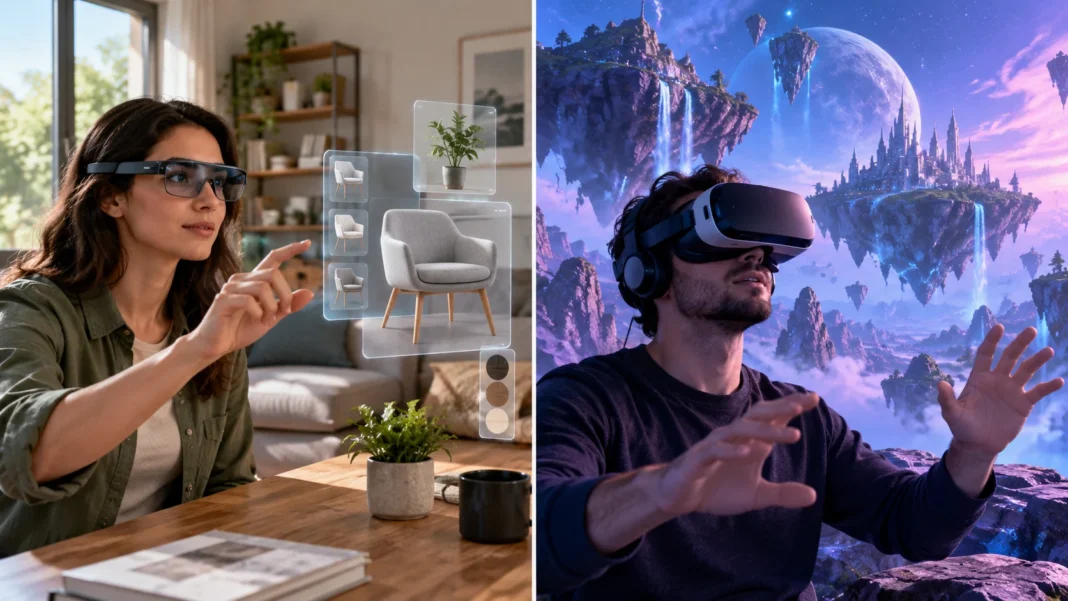
AR vs. VR: The Basic Difference
Augmented reality (AR) adds digital content to a view of the real world, while virtual reality (VR) places the user inside a computer-generated environment. With AR, you can still see your surroundings; with VR, a headset usually replaces that view with a virtual scene. Both use digital technology to create interactive experiences, but they change how you see and engage with your environment in different ways.
AR might show directions over a live view from your phone camera or let you preview a virtual sofa in your living room. VR could take you into a simulated classroom, game, or training exercise. These examples show the central distinction: augmented reality enhances a real setting, while virtual reality creates a different setting for the user to experience.
The two technologies are often discussed together because they use related tools, such as 3D graphics, motion tracking, and sensors. They also sit within the broader category of extended reality, which includes AR, VR, and mixed reality. For a wider overview, read this guide to extended reality.
What Is Augmented Reality?
Augmented reality overlays digital elements onto the physical world. Those elements might include text labels, graphics, animations, directions, or three-dimensional objects. A phone or tablet can display them on top of a camera image, while AR glasses may place them in the user’s view without requiring them to hold a screen.
AR content can respond to what a user sees or where they are. A navigation app, for example, might place arrows over a street view to show which way to turn. A furniture app could display a virtual chair in a room, helping someone judge its appearance and approximate fit before making a purchase.
Many AR experiences are designed to be used in a familiar environment. People can continue seeing the room, street, or object around them while they interact with digital information. The amount of interaction varies: some experiences simply display an overlay, while others let users move, resize, or explore virtual objects.
What Is Virtual Reality?
Virtual reality creates a computer-generated environment that users experience as though they are inside it. A VR headset typically blocks most of the user’s view of the physical surroundings and displays a virtual scene instead. That scene might recreate a real location, present an imagined world, or simulate a specific task.
Head and body tracking help the virtual environment respond as a person looks around or moves. Hand controllers, tracked hands, or other input devices can let users select items and interact with objects. When these elements work together, users can look around a 360-degree scene and feel more involved than they might when viewing it on a regular screen.
VR experiences can range from simple viewing to interactive simulations. Someone might watch a virtual tour, practice a workplace procedure, explore an educational environment, or play a game. The level of immersion depends on the headset, software, controls, and design of the virtual experience.
How AR and VR Work
AR devices use cameras and sensors to detect parts of the physical environment, track movement, or understand a device’s position. Software can use this information to place digital objects in the view. The system needs to update their position as the user moves, so an overlay appears connected to the scene rather than stuck in one place on the screen.
VR systems track a user’s movements and update the displayed environment to match. Head tracking changes the view when the person turns, while controllers or hand tracking can support interaction. The computer renders images for each eye to create a sense of depth, and responsive movement helps the virtual scene feel more immediate.
Both technologies depend on well-timed feedback between hardware and software. Delays, inaccurate tracking, or unclear visual design can make an experience feel uncomfortable or confusing. AR also needs to maintain a useful relationship between digital content and the real environment, while VR needs to keep the virtual scene responsive and easy to navigate.
AR and VR Devices
AR is available through smartphones and tablets, making it accessible to people who already own a compatible device. Their cameras show the real world, while the screen displays digital elements over it. AR glasses can provide a more hands-free experience, but the type of content and interaction depends on the device.
VR generally uses a headset with screens or lenses positioned in front of the eyes. Some headsets connect to a computer or console, while others run apps on their own. Controllers are common, but some devices can track hand movement, giving users another way to interact with virtual objects.
The choice of device affects the experience, but it does not change the core difference between AR and VR. A smartphone AR app can be useful for a quick visualization, while a headset can provide a more immersive VR session. Before choosing hardware, consider what you want to do, how long you will use it, and where the experience needs to work.
Key Differences Between AR and VR
The first difference is how each technology relates to the user’s surroundings. AR keeps the physical environment visible and adds digital information to it. VR places the user in a virtual environment that takes over most or all of their view, making it feel more separate from the space they are physically in.
Their common devices and use cases also differ. AR can work through a mobile phone, tablet, or smart glasses, which can make it convenient for short, location-based tasks. VR usually relies on a headset and is well suited to experiences that benefit from immersion, such as simulated practice or exploring a designed world.
Neither technology is automatically better; the right choice depends on the goal. AR can help when users need digital guidance while remaining aware of real objects and people. VR can be suitable when an experience calls for full attention inside a controlled simulation, virtual location, or interactive environment.
Common Uses of Augmented Reality
Retail businesses use AR to help customers visualize products before buying. A shopper might preview furniture in a room, see how a decorative item looks on a wall, or try a virtual version of a product through a phone camera. These previews can help people make decisions, although they may not perfectly represent a product’s real color, size, or texture.
AR can also provide location-based navigation and practical information. A digital arrow might point toward a destination, or a label could identify a landmark when viewed through a device. In workplaces, AR instructions may appear near a piece of equipment, giving a worker visual guidance without making them repeatedly consult a separate manual.
Education and entertainment use AR to make digital content part of a real setting. Students might view a 3D model of a planet or machine on a desk, while a game could place interactive characters in a familiar outdoor space. These activities can encourage exploration, provided the experience supports the learning or entertainment goal rather than distracting from it.
Common Uses of Virtual Reality
VR is often used for training and simulation. Learners can practice a procedure or respond to a simulated situation in a controlled environment before attempting it in real life. Examples may include practicing equipment operation, exploring a flight simulation, or rehearsing a customer interaction, depending on the program and its level of realism.
Entertainment is another familiar VR use. A virtual reality game can surround the player with a digital world and let them interact with it using tracked movement or controllers. VR can also offer virtual tours, interactive storytelling, and social experiences that bring users together in a shared digital space.
Design and education teams may use VR to help people explore a place or object from different viewpoints. An architect could present a proposed building as an immersive walkthrough, while a learner might investigate a simulated environment. These applications can be useful, but their effectiveness depends on accurate content and a comfortable, well-designed experience.
Benefits and Limitations of AR and VR
AR can provide context because digital information appears alongside the real object or location it describes. It may help people preview products, follow visual directions, or access instructions while working. Since many AR experiences run on phones or tablets, users may be able to try them without purchasing a dedicated headset.
VR can create immersive experiences that are difficult to reproduce through a flat screen. It allows users to explore a virtual setting or practice a scenario in a controlled environment. However, a headset can be costly or uncomfortable for some people, and extended use may cause eye strain, disorientation, or motion discomfort.
Both technologies need thoughtful design and a suitable use case. AR overlays can obscure real objects or become distracting, while VR can limit awareness of physical surroundings. Accessibility, privacy, setup requirements, and user comfort should be considered when choosing an experience for a classroom, business, or personal activity.
Where Mixed Reality Fits
Mixed reality (MR) refers to experiences where digital content and the physical environment interact more closely. A virtual object may appear anchored to a real surface or respond to the shape of the room. The specific meaning of “mixed reality” can vary between products and platforms, so the label alone does not always describe exactly what a device can do.
AR, VR, and MR are commonly grouped under the term extended reality, or XR. The categories can overlap because devices use similar technologies, and product descriptions may use different terms. As a general guide, AR adds digital content to a real-world view, VR replaces that view with a virtual environment, and MR emphasizes interaction between the two.
Understanding these terms can help when comparing devices or planning an experience. Ask whether users need to see their surroundings, enter a fully simulated space, or interact with digital objects that appear connected to real places. The answer will point toward the kind of technology and hardware that best fit the task.
Choosing Between AR and VR
Choose AR when users need to see and respond to their physical surroundings while receiving digital information. It can suit tasks like previewing a product at home, viewing location-based directions, or checking visual guidance near equipment. A phone-based AR experience may be a practical first option when people need a simple, portable tool.
Choose VR when the main goal is to immerse users in a virtual environment. It may fit a training simulation, interactive game, or design walkthrough where a headset can provide useful depth and perspective. Consider the space, headset comfort, session length, and whether participants can use the controls before building a VR activity around it.
For either technology, define the problem before selecting a device. Think about who will use the experience, what they need to see or do, and how success will be measured. A small trial can show whether the technology makes the task clearer or more useful than a regular screen, printed guide, or in-person demonstration.
Conclusion
AR and VR both use digital content to create interactive experiences, but they change the user’s view in different ways. AR adds digital elements to the physical world, while VR immerses users in a computer-generated environment.
AR is often useful when people need context or guidance in a real setting. VR can be a better fit for immersive entertainment, training, and virtual exploration. Mixed reality sits between these approaches by connecting digital objects more closely with physical surroundings.
The right choice depends on the task, the people using it, and the experience you want to create. Consider comfort, accessibility, hardware, and the value it adds before choosing a technology. A well-matched AR or VR experience should make an activity clearer, more engaging, or easier to practice.
FAQs
What is the main difference between AR and VR?
AR adds digital content to the real world, so users can still see their surroundings. VR replaces most of the user’s view with a computer-generated environment.
Do AR and VR require different devices?
AR can work on smartphones, tablets, or smart glasses, while VR usually requires a headset. Some devices support experiences that combine features of both technologies.
Is a smartphone game AR or VR?
A game that uses a phone camera to place digital objects in the real environment is AR. A game viewed inside an immersive headset is generally VR.
Which is better for training, AR or VR?
It depends on the task. AR can show guidance alongside real equipment, while VR can let learners practice within a simulated environment.
What is the difference between AR, VR, and MR?
AR overlays digital content on the real world, VR immerses users in a virtual environment, and MR connects digital objects more closely with physical surroundings.